Building or upgrading an airsoft replica should not require trial-and-error part buying or guessing which spring hits your local field limit. Airsoft Workbench Suite lets you assemble your complete internal build on your PC, verify physical compatibility in 3D, and simulate velocity, rate of fire, part wear, and downrange trajectory before turning a single screw.
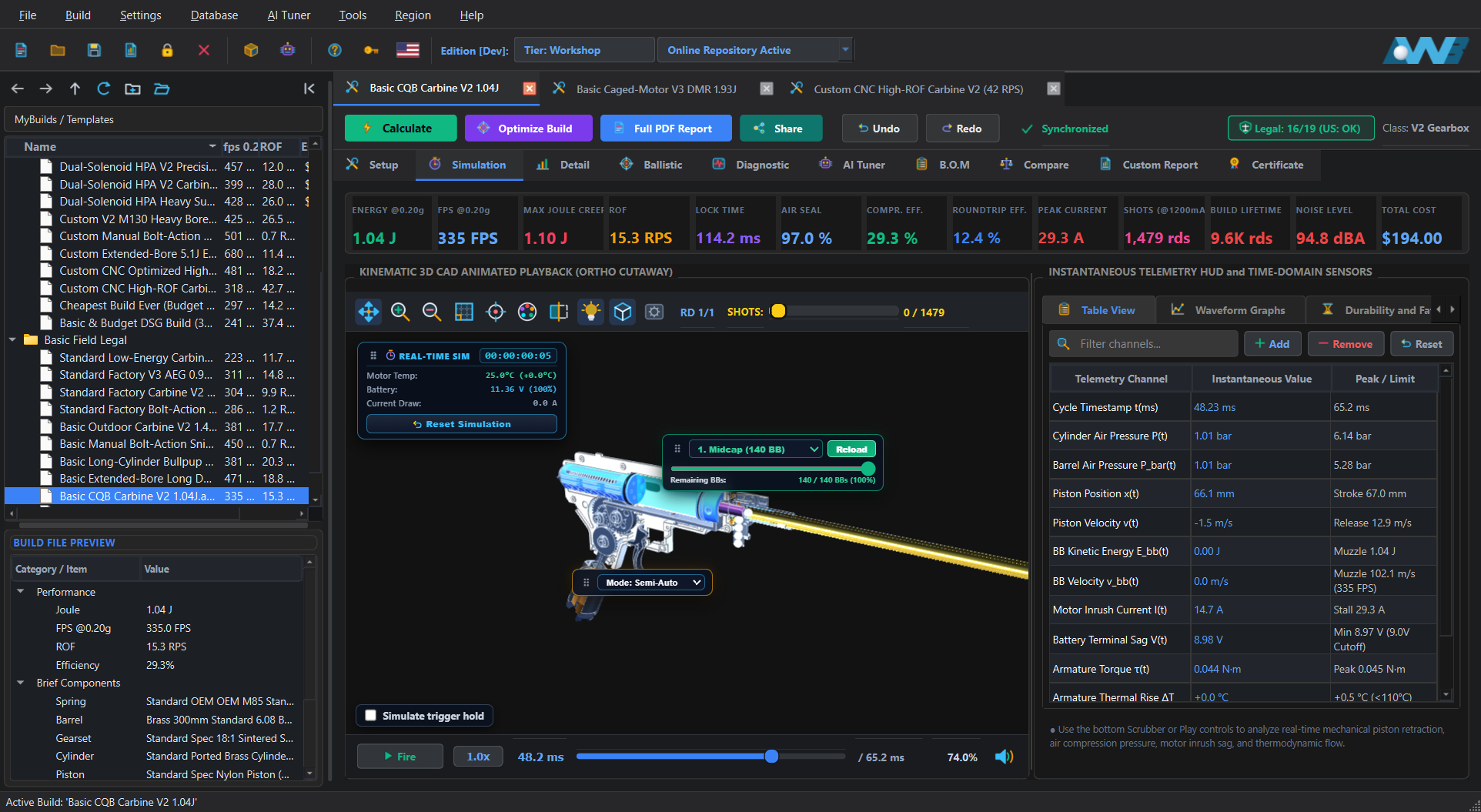
Whether you are planning a simple spring upgrade or engineering a custom drivetrain from scratch, the core workspace handles the entire process from part selection and physical fitment checks to full-cycle simulation, downrange trajectory, and shopping list generation. Scroll further down whenever you want to explore specialist bench diagnostics and commercial workshop tools.
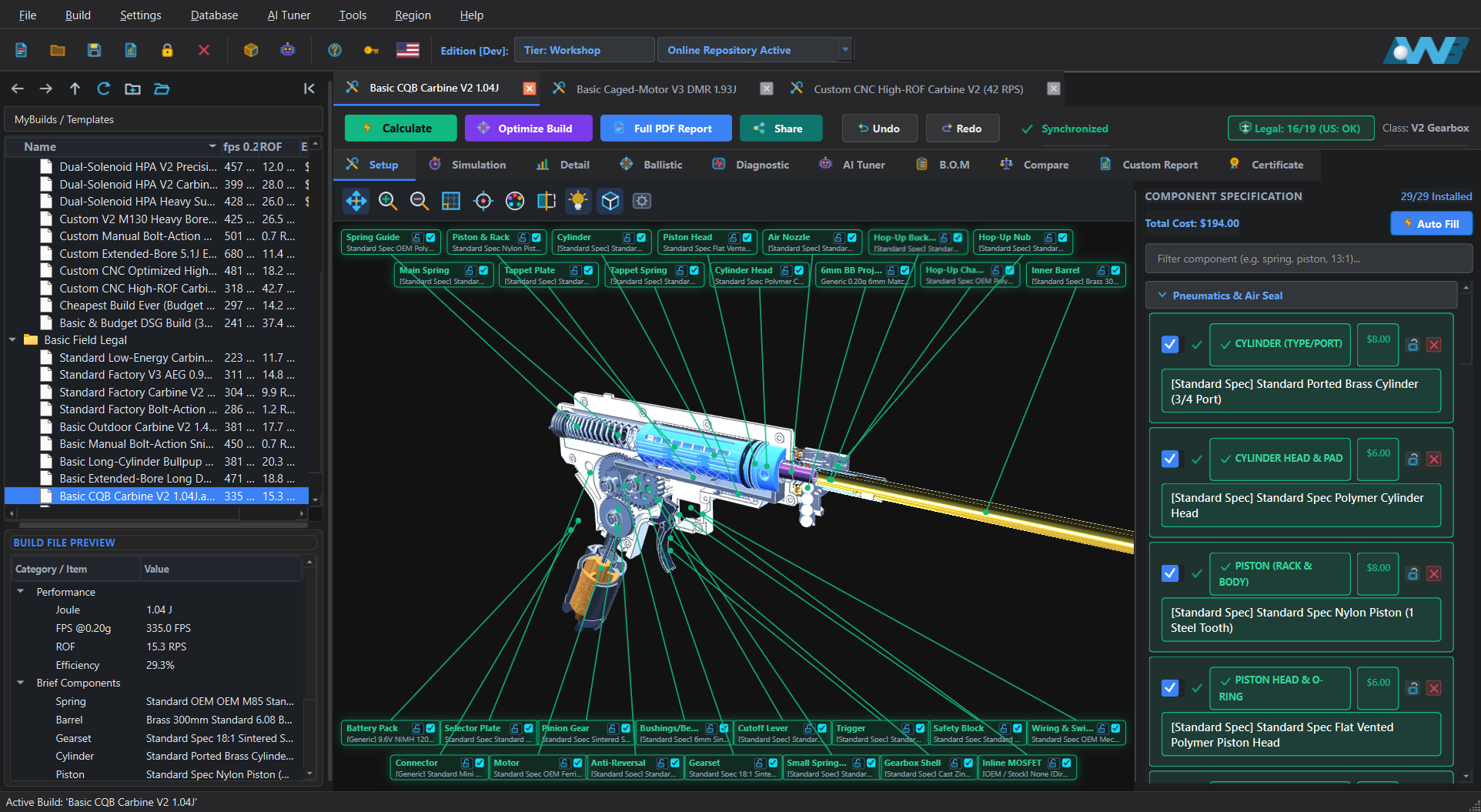
Start by choosing your replica platform (Standard Carbine, Caged-Motor AEG, Extended-Bore DMR, Bullpup SMG, Heavy Support AEG, Manual Bolt-Action Spring, or Drop-In HPA) and selecting internal components. As you pick parts or apply custom modifications such as short-stroking, AOE spacers, or hop-up mods, the 3D cutaway updates in real time.
Real-Time Build Guardrails: You do not have to wait until you press Calculate to catch fitment mistakes. If you pair a Bore-Up cylinder with a standard head, an extended DMR sector gear with a standard piston rack, or mismatched bolt-action trigger sear and piston catch angles, the software displays a clear warning or modification recommendation immediately.
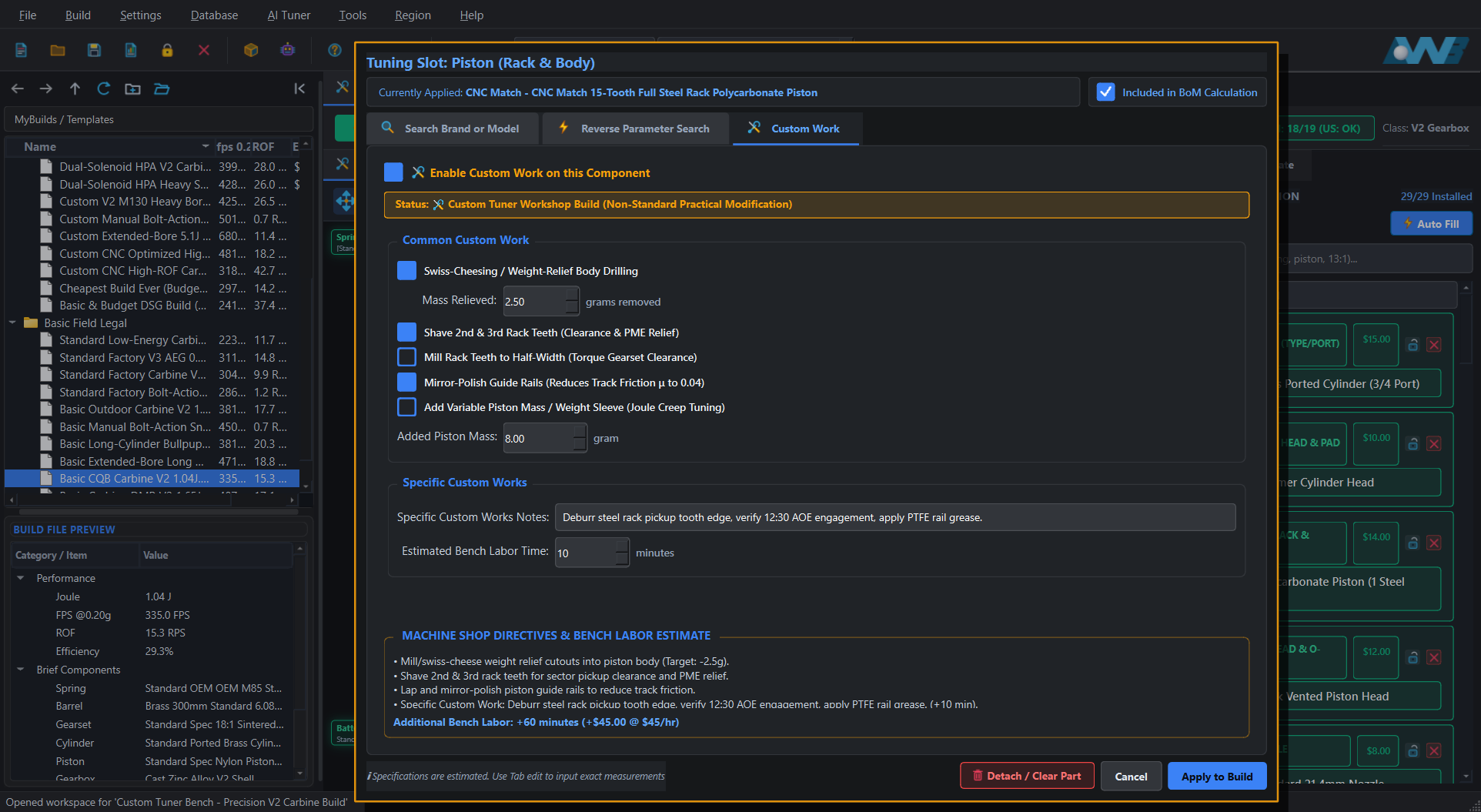
Real airsoft engineering rarely stops at dropping stock catalog parts into a receiver. Before running your simulation, open the Custom Work tab on any core component to apply authentic bench modifications that directly alter physical solver parameters.
Press Calculate to run the coupled physics solver. Instead of relying on rough spring labels, the engine computes how your motor, battery, gears, spring, air seal, and barrel interact across every microsecond of the shot.
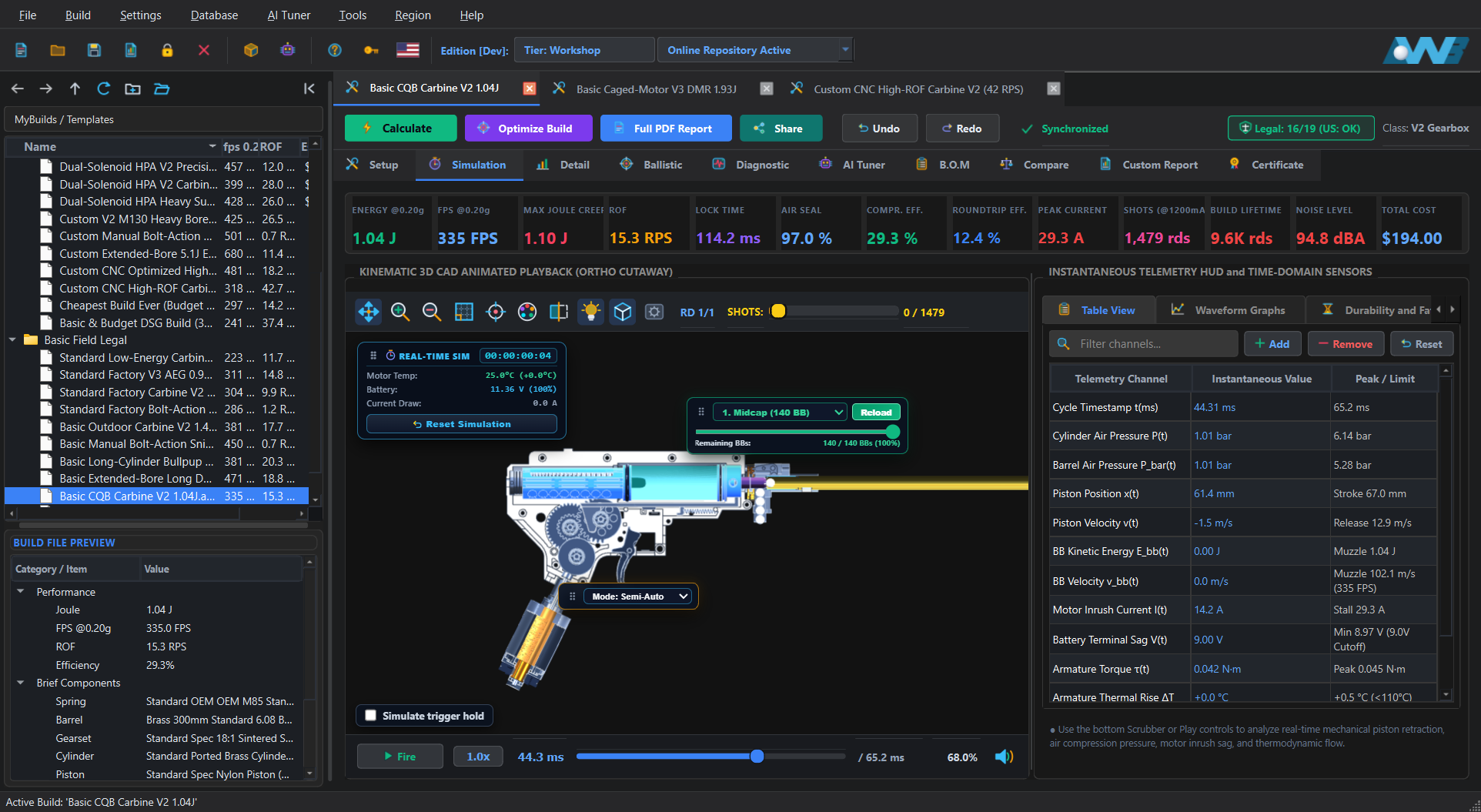
Every frame is computed from continuous electromechanical and pneumatic physics, zoomed directly onto the exact 3D collision or air-leak coordinate.
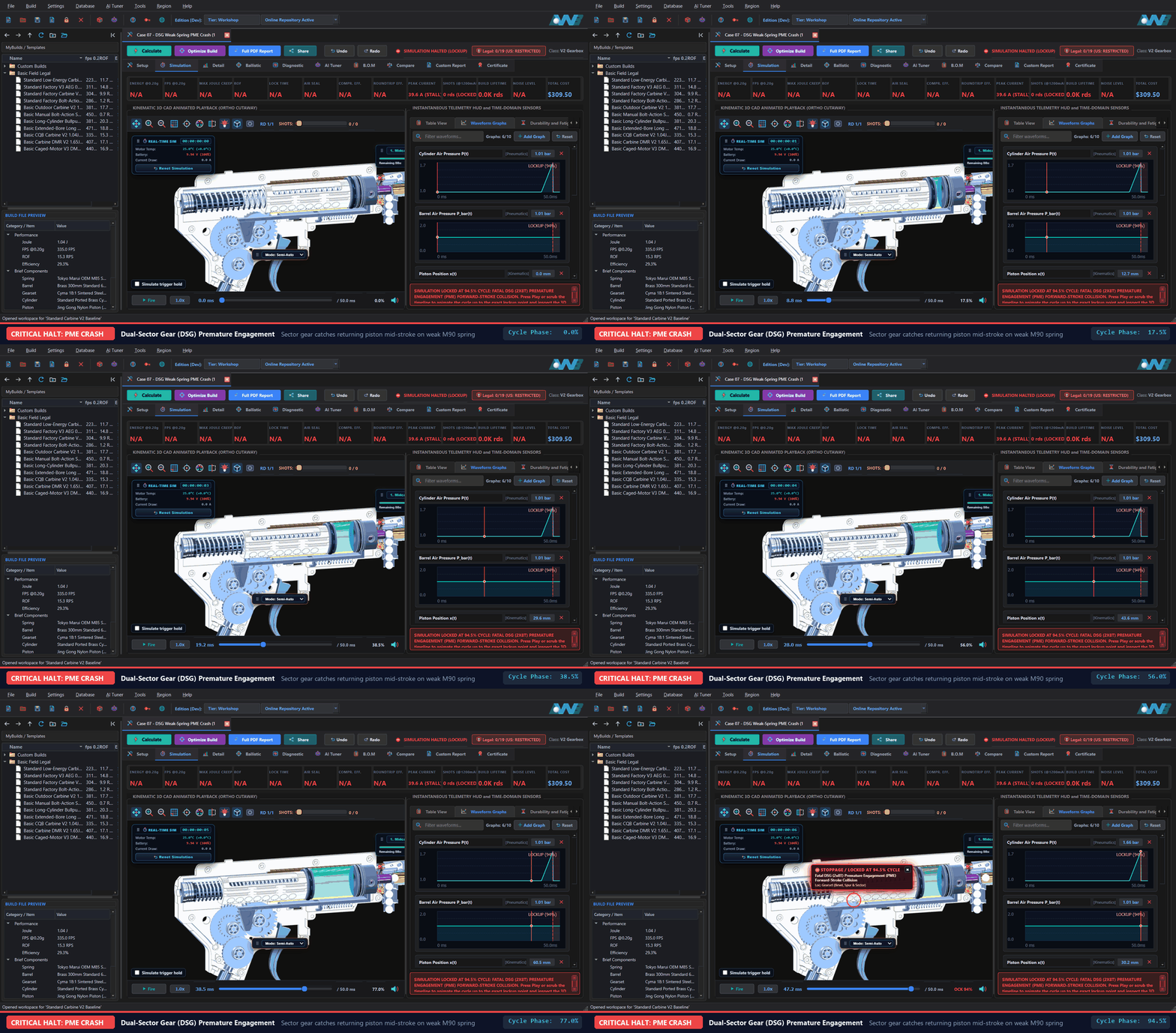 CRITICAL HALT : 94.5% CYCLE
Second sector tooth bank catches the returning piston rack mid-stroke when paired with an under-strength return spring, halting at the exact tooth collision point.
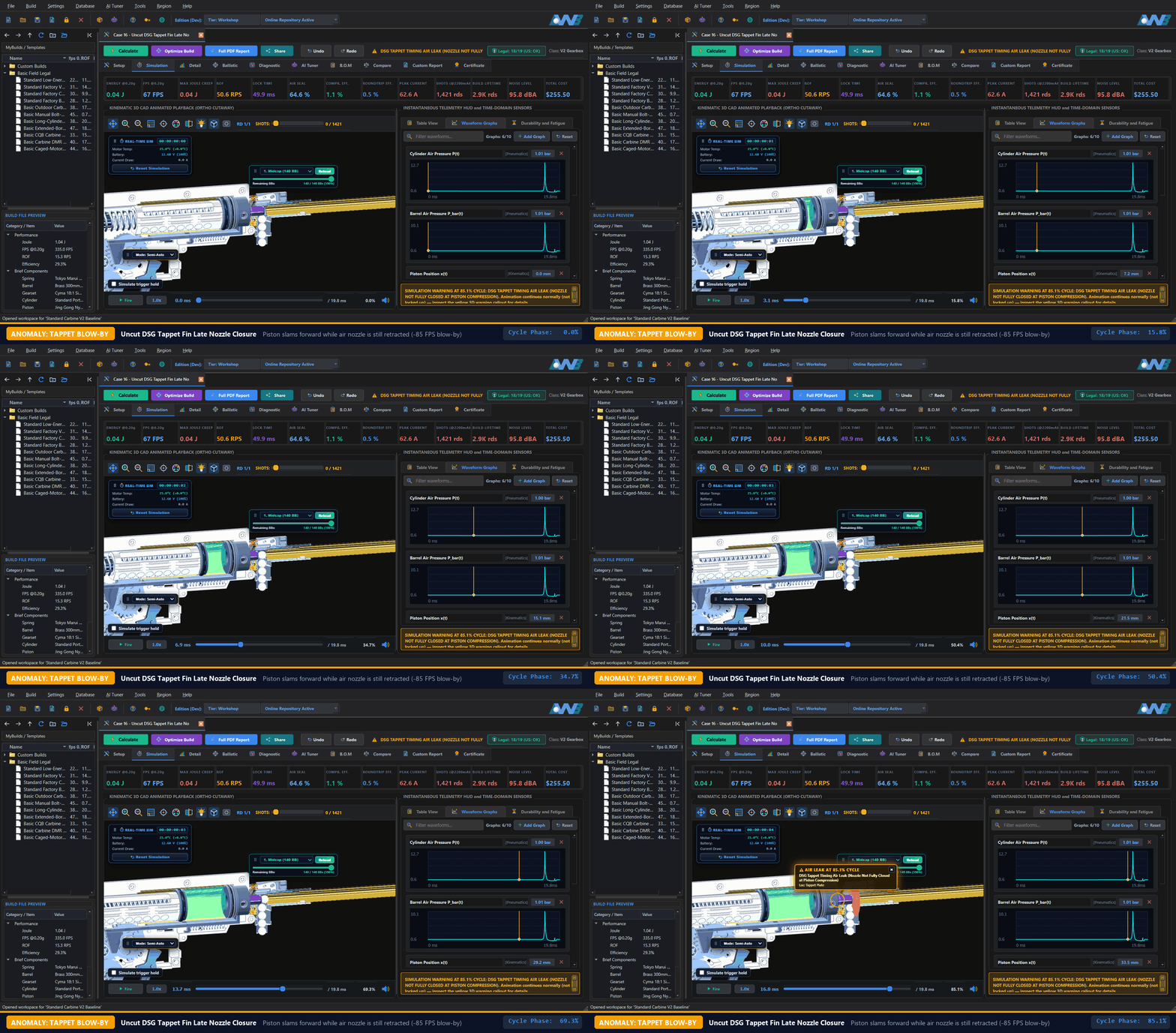 AIR LEAK : 85.1% CYCLE
At high cycle rates, an untrimmed tappet fin holds the air nozzle partially retracted while the piston compresses air, venting pressure through the feed throat.
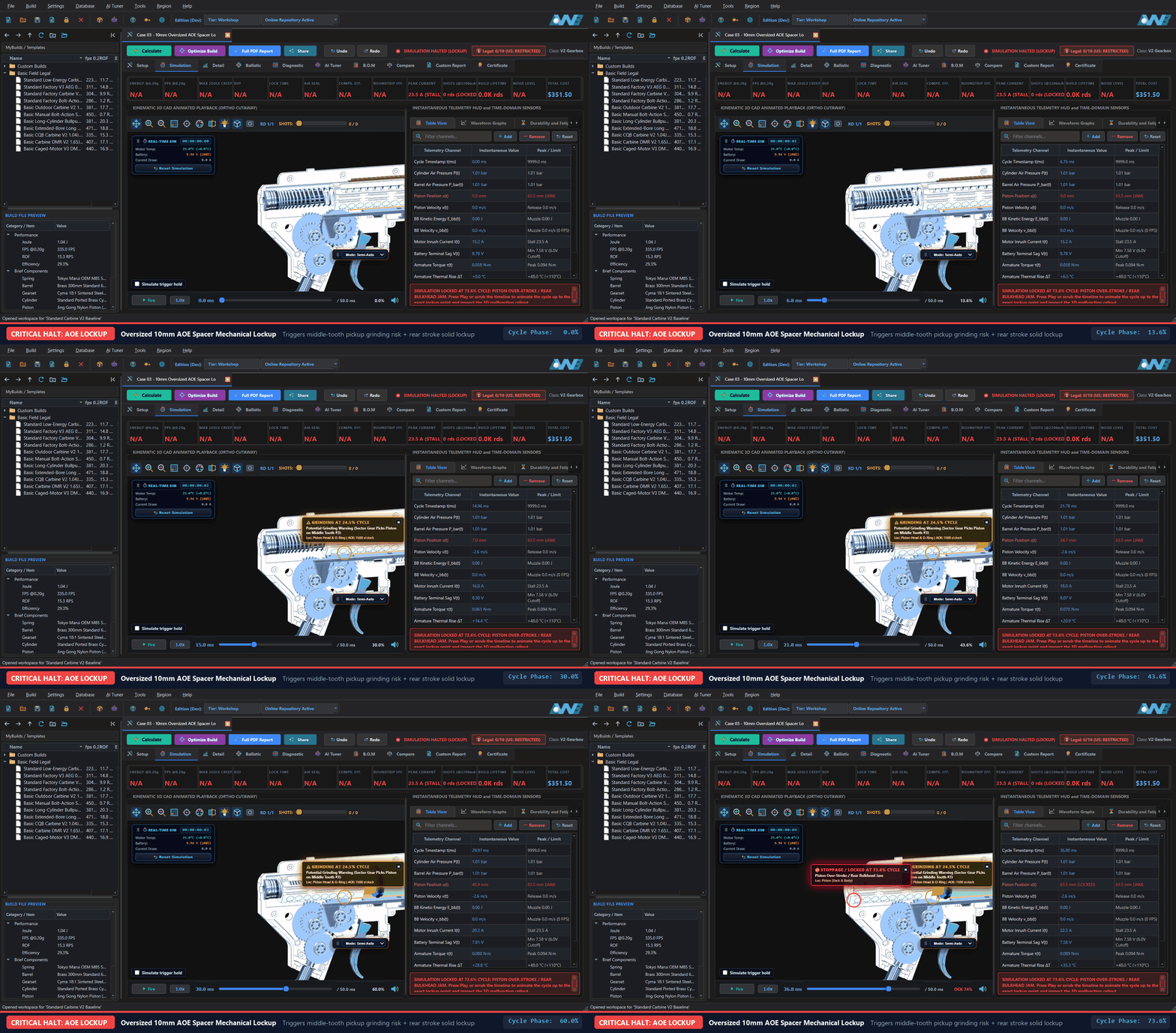 LOCKUP + GRINDING : 73.6%
Simultaneously flags yellow middle-tooth pickup grinding at 24.5% cycle and red rear piston over-stroke lockup at 73.6% cycle in 1:1 3D sync.
Basic calculators hide behind static lookup tables and secret fudge factors. Airsoft Workbench Suite is built on pure first-principles physics, and we are 100% honest about every equation coefficient and physical constant used in our ODE and 6-DOF solvers. Open Settings → Parameters... at any time to inspect, edit, export, or calibrate the global constants driving the engine.
Cd, cylinder wall heat transfer h_wall, O-ring and bucking friction μ), Environment & Ballistics (air density ρ, adiabatic index γ, sphere drag Cd, Magnus lift scale), Drivetrain & Electromechanics (involute pressure angle α, copper tempco α_Cu, armature thermal mass, brush/MOSFET resistance), and Sub-Millimeter Clearances.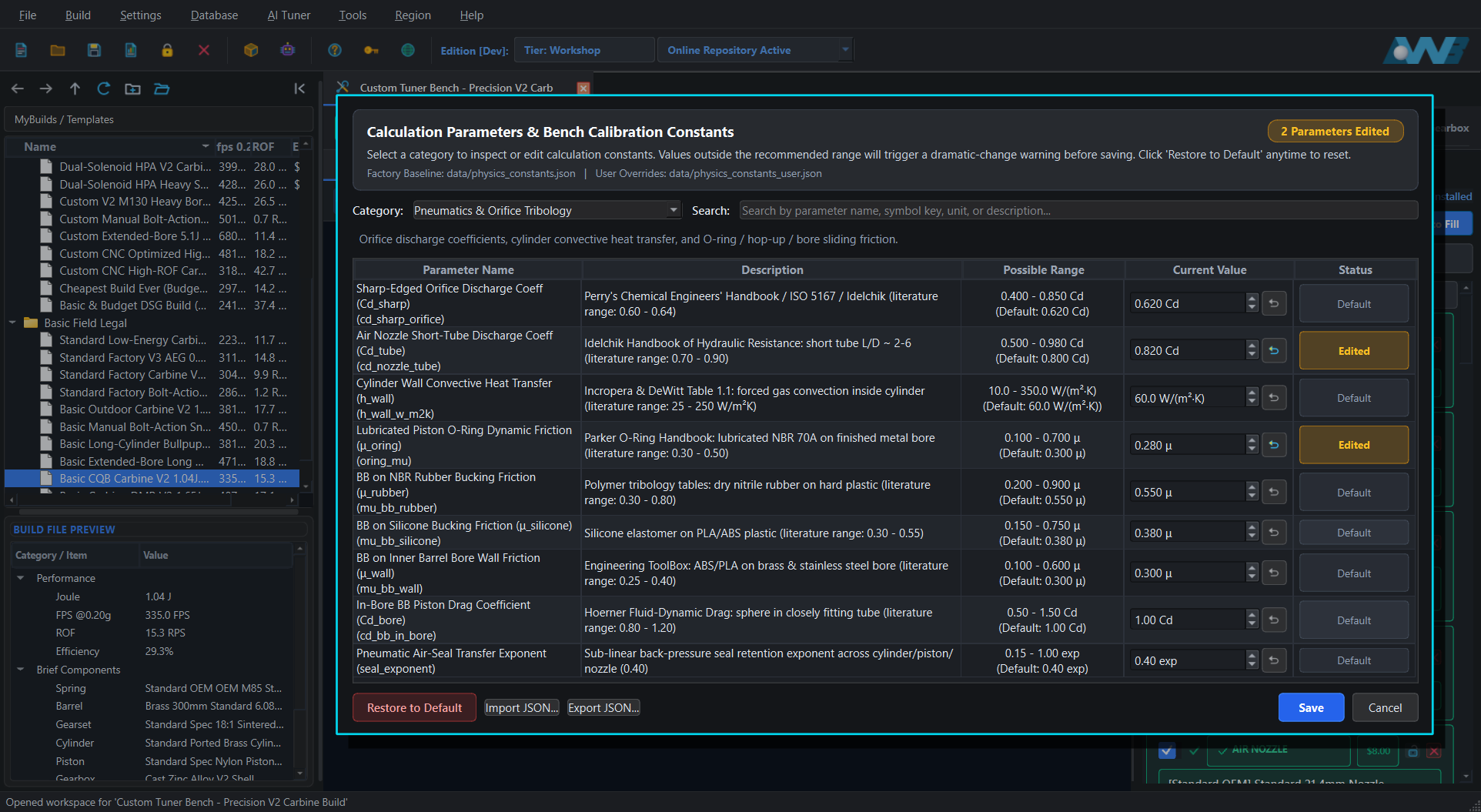
Muzzle velocity at the chronograph is only half the story. Instead of typing guessed numbers into a disconnected chart, your internal build's simulated muzzle energy, cylinder-to-barrel volume ratio, hop-up bucking rubber hardness, and nub geometry feed directly into the Ballistic workspace.
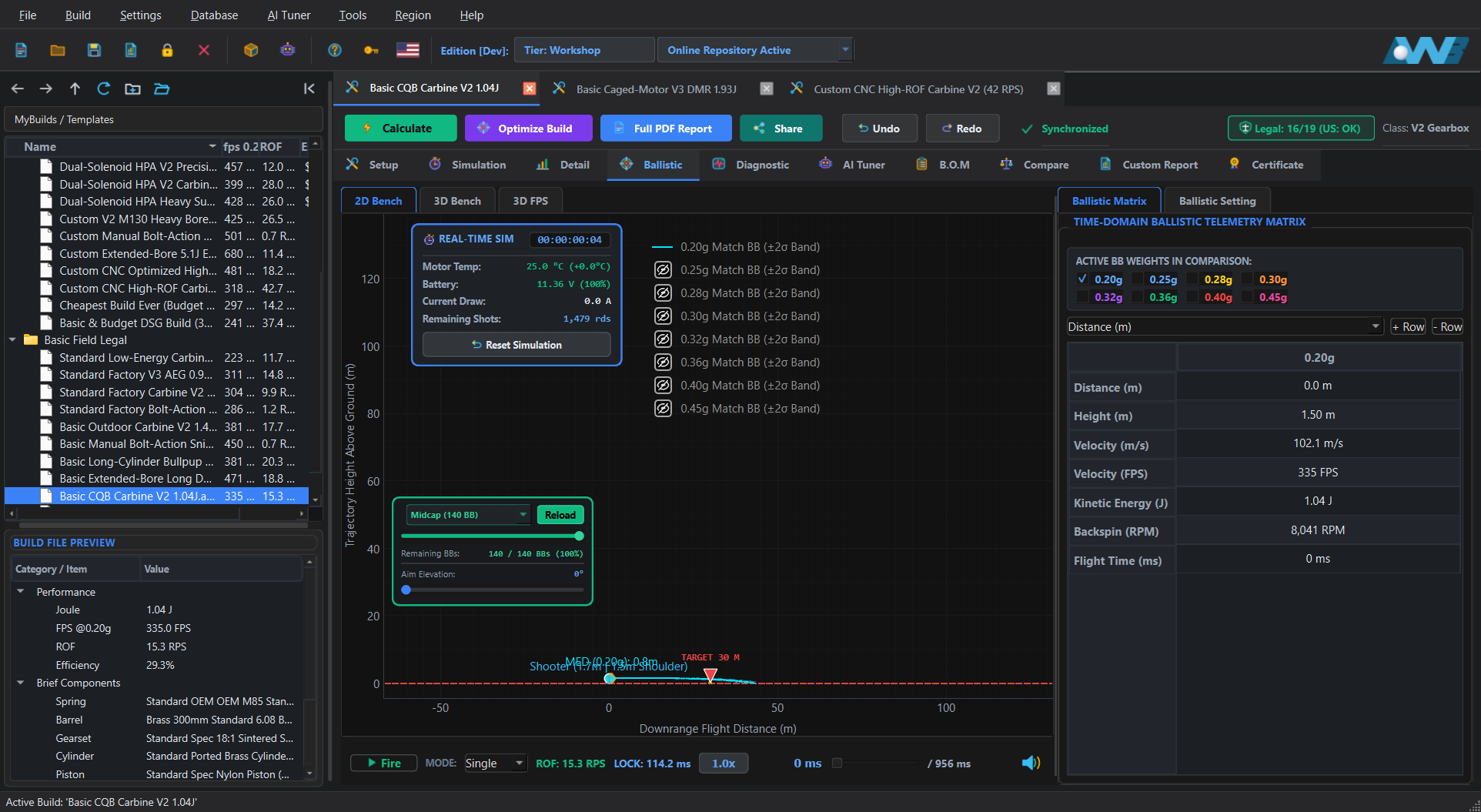
Understand the exact role of each ballistic viewport: verify true 1:1 physical elevation in 2D Bench, test the build's pure theoretical accuracy ceiling in a locked rest in 3D Bench, and move freely with live aiming in 3D FPS to see how the replica handles in the field.
 2D BENCH : 1:1 PHYSICAL SCALE
Displays the true 1:1 horizontal-to-vertical flight profile, tracking the 0.40g burst through the 75m target silhouette and plotting post-target drop until ground touchdown.
 3D BENCH : STATIC THEORETICAL LIMIT
Locks your replica into a fixed shooting rest aimed dead-center at the target. Eliminates human movement and aiming sway so you can measure the pure theoretical accuracy limit, hop-up flight consistency, and grouping dispersion of the build under controlled static conditions.
 3D FPS : FREE AIMING & MOVEMENT
Lets you move freely around the 3D range (WASD + Jump), transition between hip-fire and magnified ADS optics, and test free aiming on the move. Simulates how your build actually performs in the field under dynamic movement, cheek-weld gearbox vibration, and rapid full-auto follow-up shots.
Integrates 3D position and velocity vectors alongside rotational spin decay at fine time steps, preventing drift across long-range trajectories.
Models the perpendicular Magnus lift vector generated by hop-up backspin and tracks aerodynamic skin-friction spin deceleration downrange.
Accounts for altitude, barometric pressure, temperature, humidity, crosswind drift, cylinder under-volume suck-back, and over-volume muzzle blast turbulence.
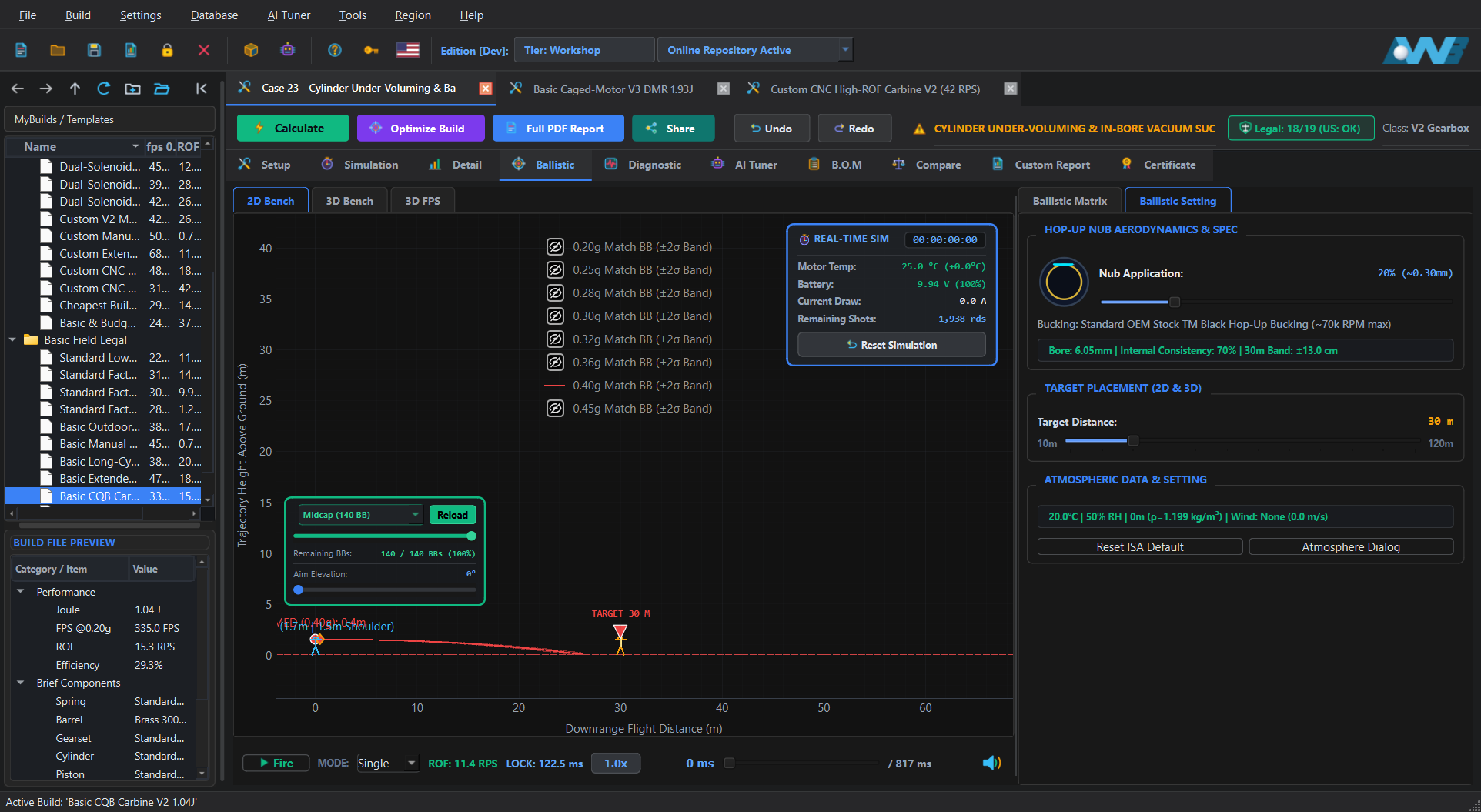 BALLISTIC FAULT
Ported cylinder runs out of swept air volume before a heavy BB exits a long barrel, creating negative pressure drag and severe drop.
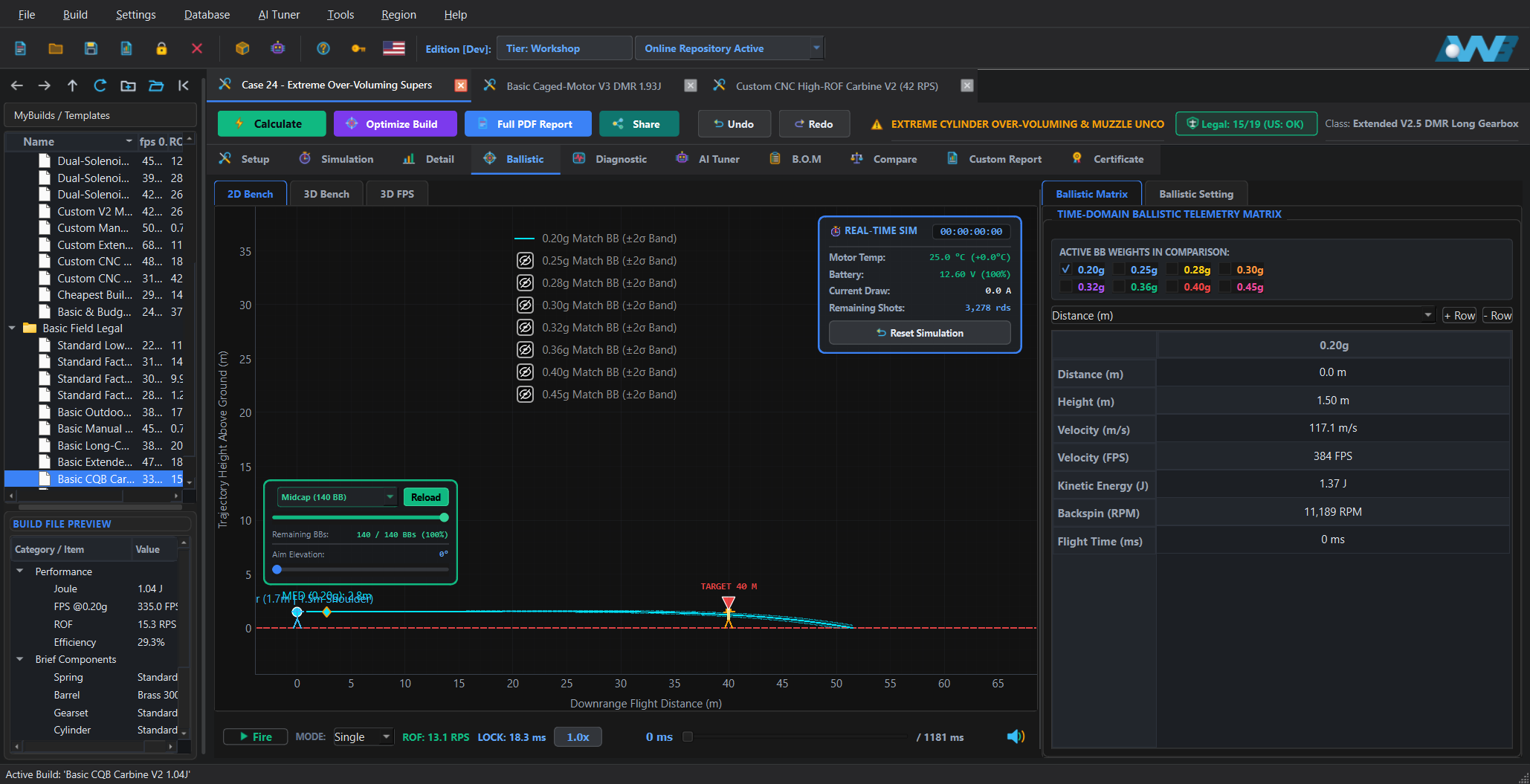 DISPERSION FAULT
Excessive unexpanded cylinder gas vents violently around the BB at muzzle exit, inducing yaw turbulence and widening the 3D dispersion cone.
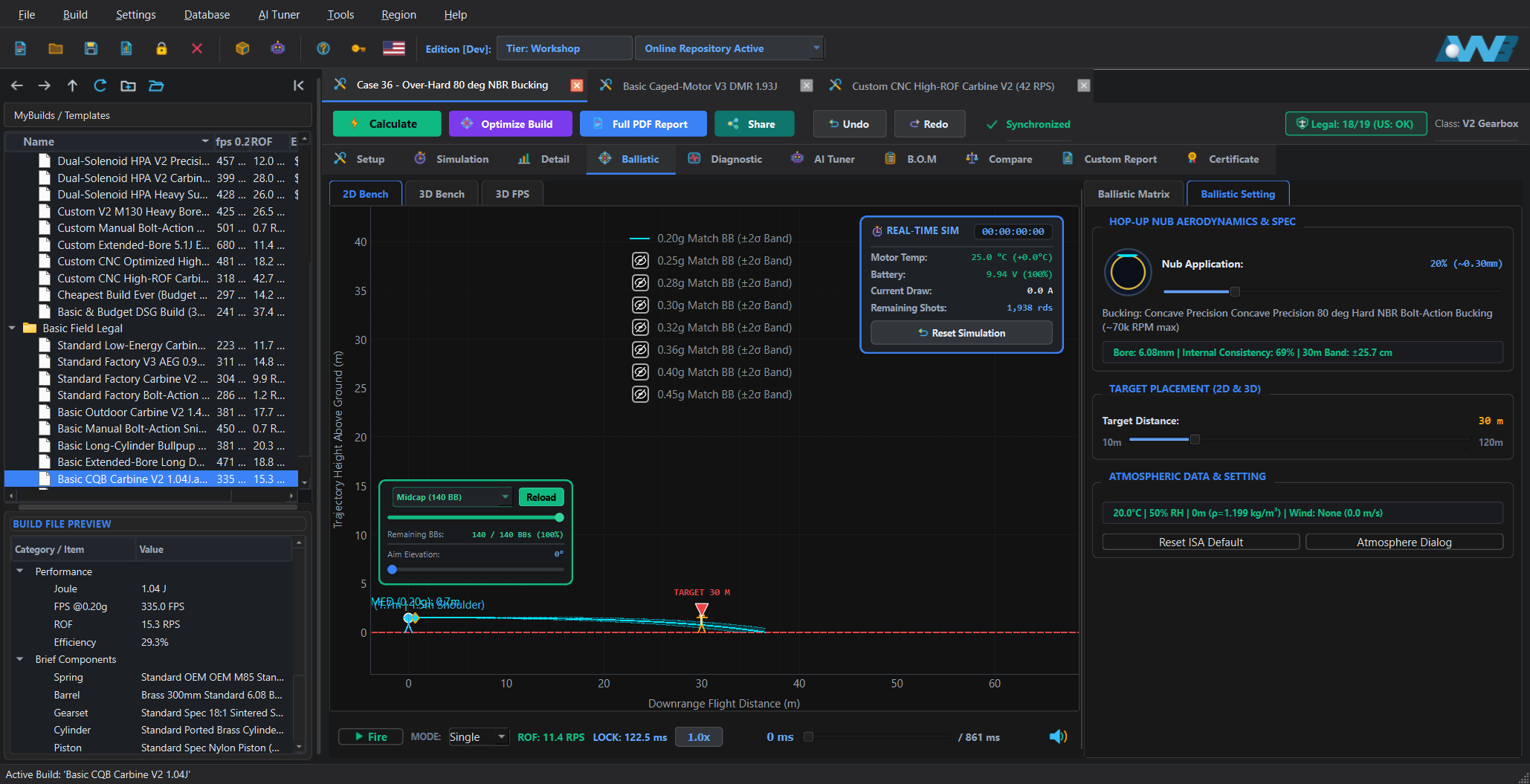 HOP-UP FAULT
Models rubber hardness against muzzle velocity and cold ambient temperature, flagging bucking lip tear risk or freezing friction loss.
Once your internal physics and exterior ballistics are calculated, the software automatically evaluates whether your build is legal across supported countries. Every simulation cross-checks muzzle energy (Joules), velocity, and rate of fire against national statutory laws and regional field rules before you buy parts or hand a replica to a customer.
0.98 J statutory limit, Germany's WaffG rules, or UK PCA 2017 limits).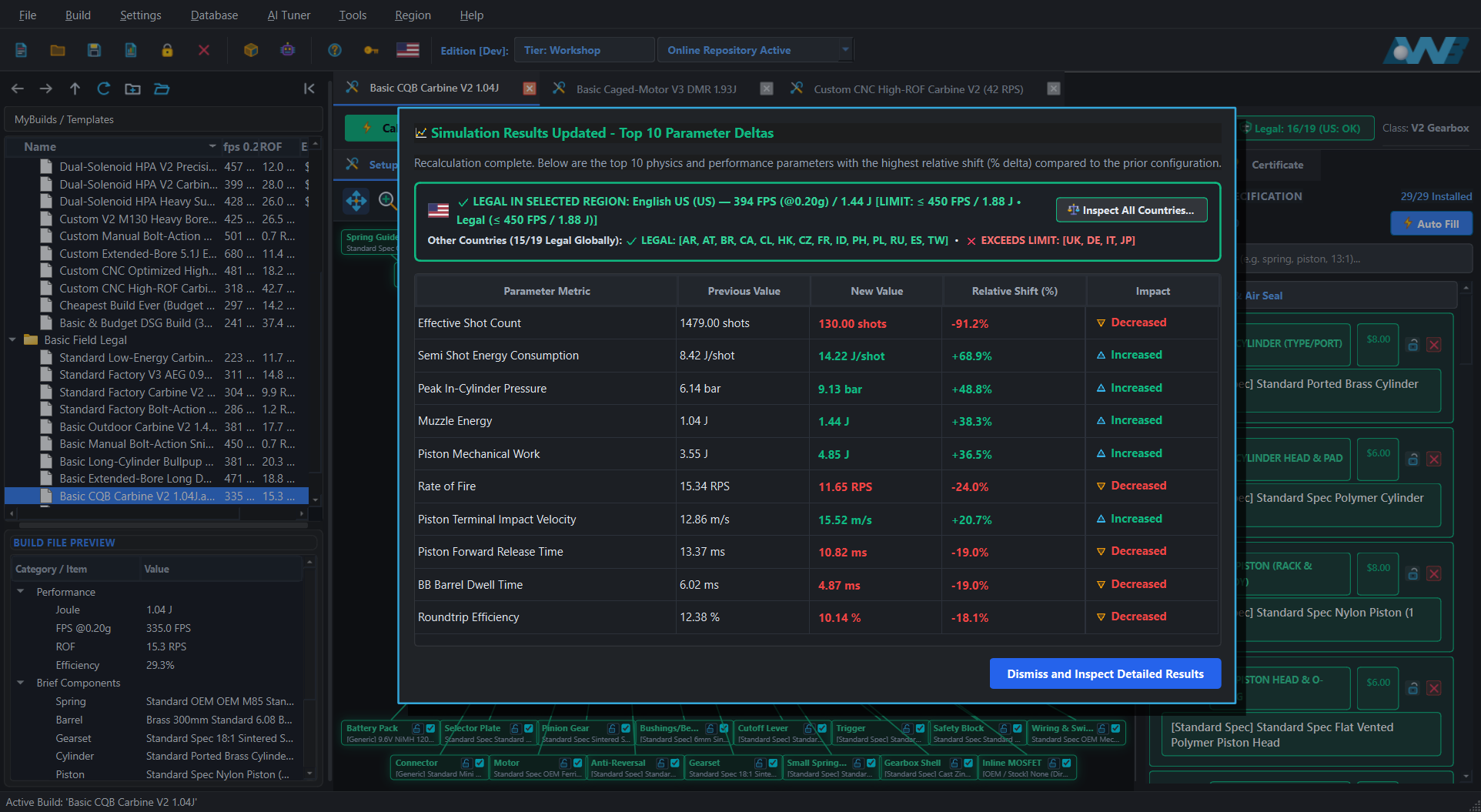
Once your build hits your target performance and passes all reliability checks, the B.O.M (Bill of Materials) tab automatically lists every selected part, custom modification, and retail price.
.awb build file, export the shopping list to Excel/CSV, or print a complete PDF build report.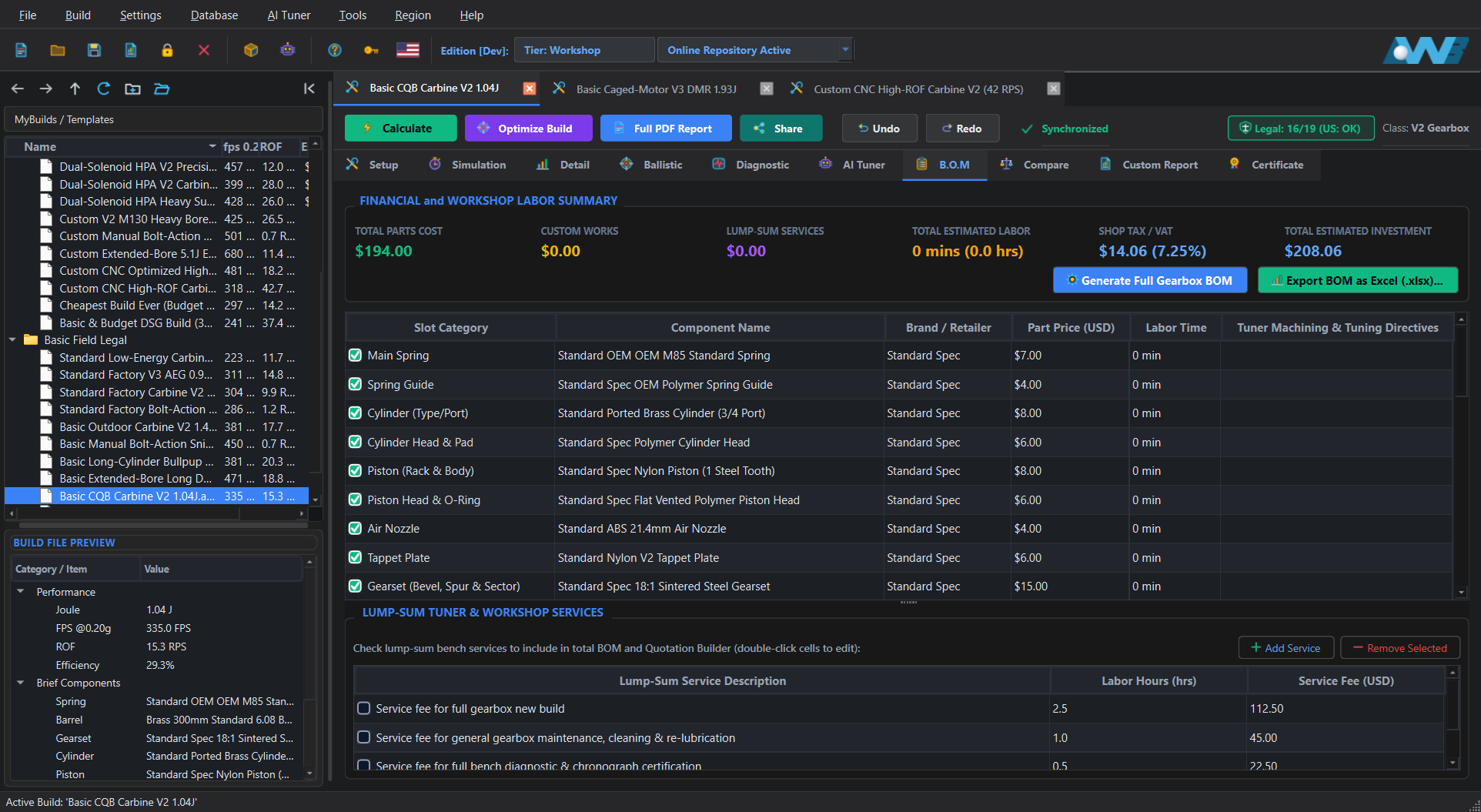
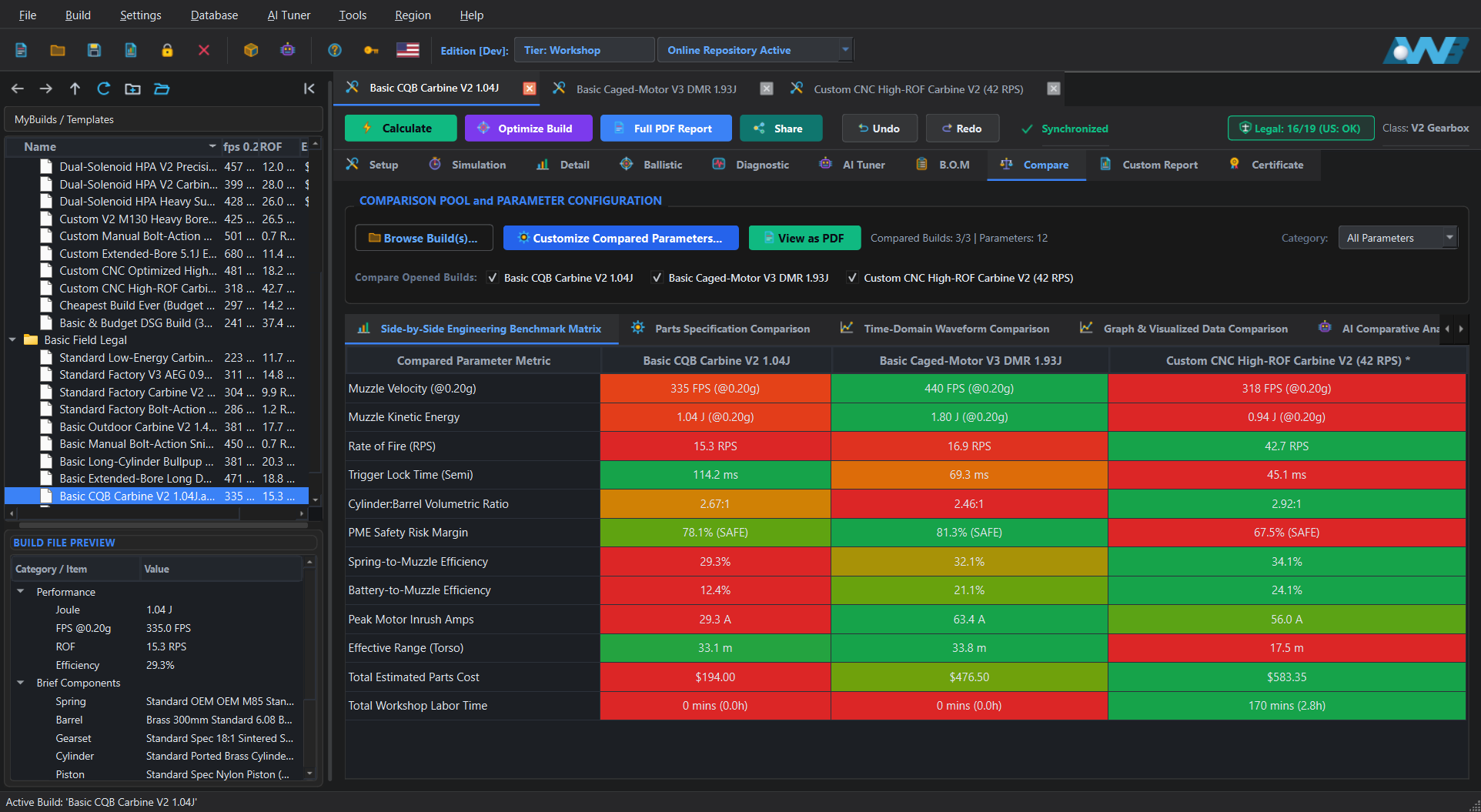
Debating between a high-torque gear build, a short-stroked high-speed setup, or a brushless motor configuration? Open multiple builds concurrently and compare their engineering benchmark tables, part differences, and overlaid millisecond waveforms before buying parts.
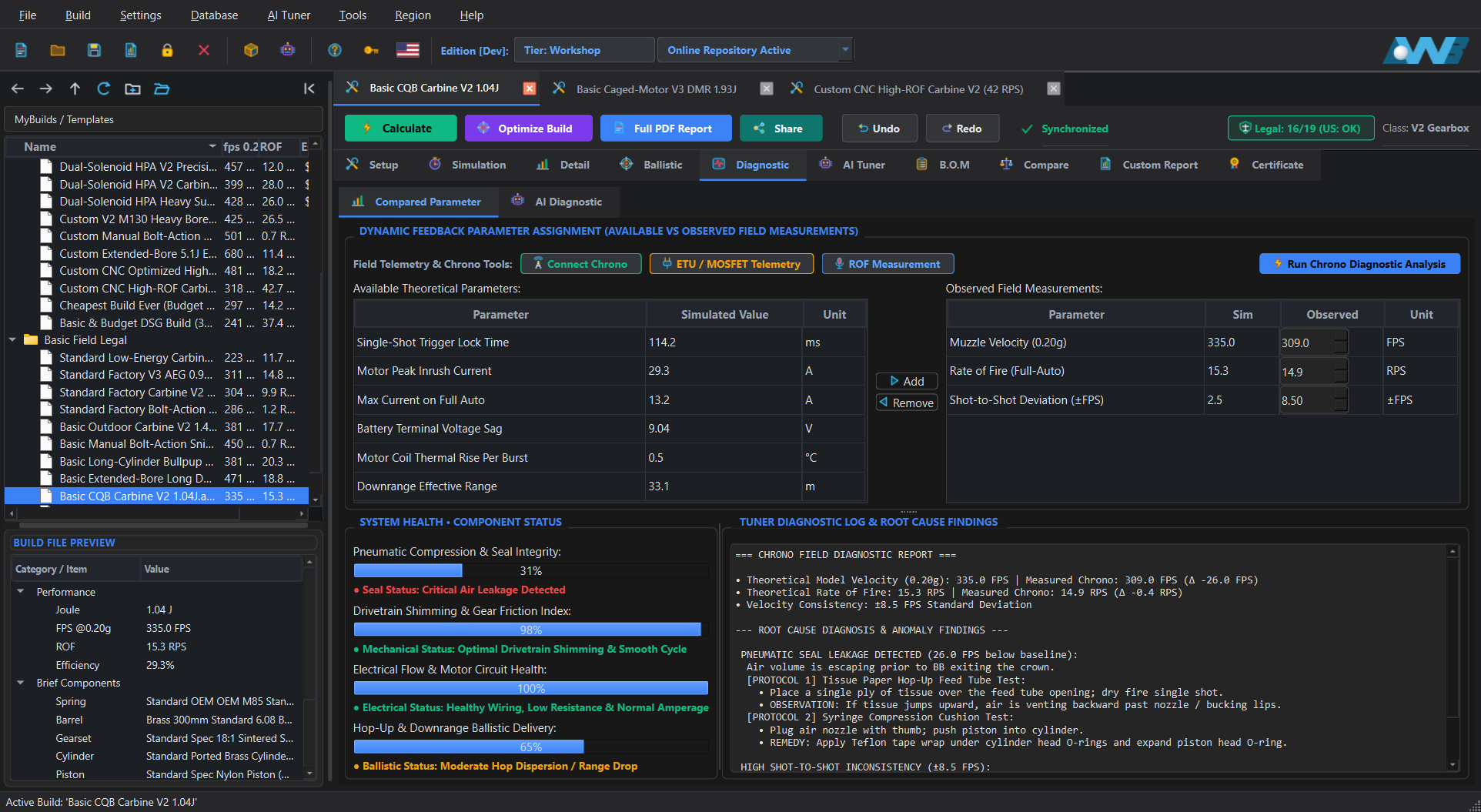
If your physical replica shoots lower on the bench than simulated, feed your real measurements into the Diagnostic tab to isolate air seal leaks, tappet timing loss, or mechanical drag. Includes integrated Pro Tools for acoustic ROF measurement, Bluetooth Chronograph telemetry, and Bluetooth ETU connection.
Connected directly to your active build, simulation telemetry, and built-in offline Tuner Knowledge Base (or optional cloud API key). Set your target velocity and ROF goals, and apply recommended catalog parts directly into your build with one click.
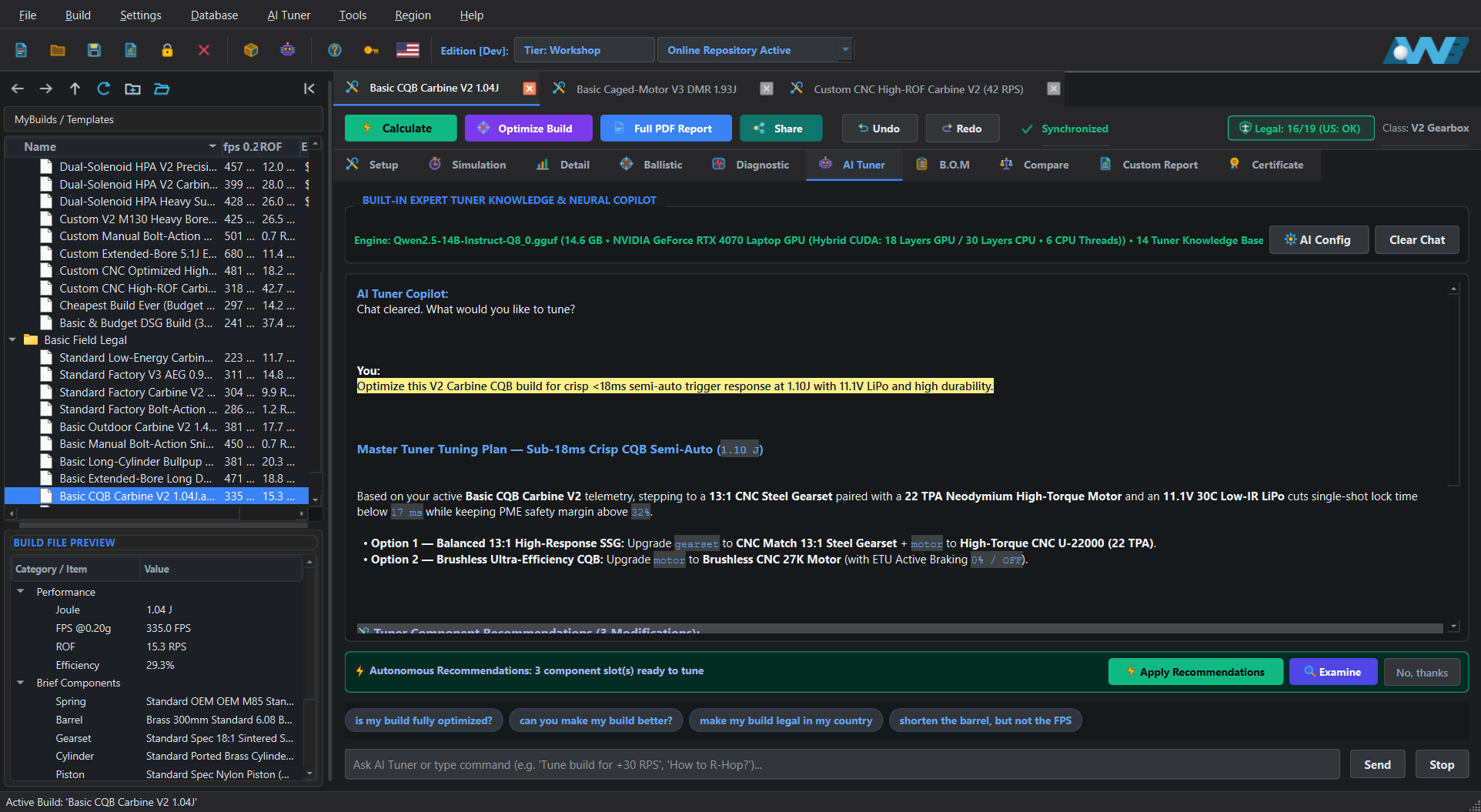
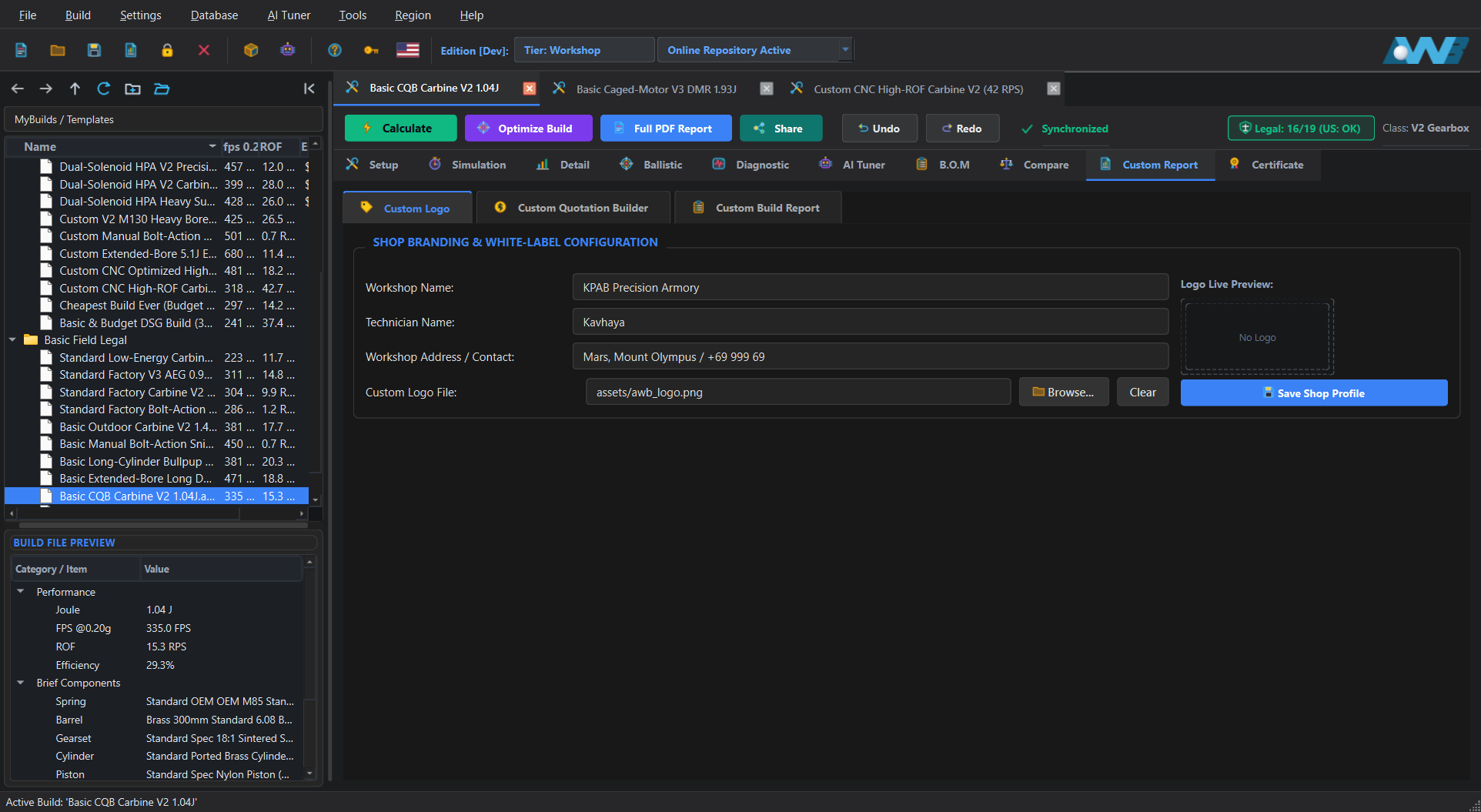
If you build and service replicas for paying customers, the commercial workshop suite adds white-label client quotation sheets, custom shop branding, tamper-evident QR build certificates, and cloud .awbz storage in the AWB Online Repository.
Put your own workshop logo on every document. Build itemized customer quotes separating Parts B.O.M, Custom Tuner Labor (shimming, AOE correction, hop-up work, wiring), and Shop Warranty Terms, then print a complete client handover report.
Export cryptographically signed .awbz packages locally, publish them to the AWB Online Repository, manage your shop's published builds, and generate a weather-resistant QR sticker. When your customer brings their replica to an event, anyone on the field can scan the QR sticker to view your workshop brand, internal recipe, and verified chrono output on the web.
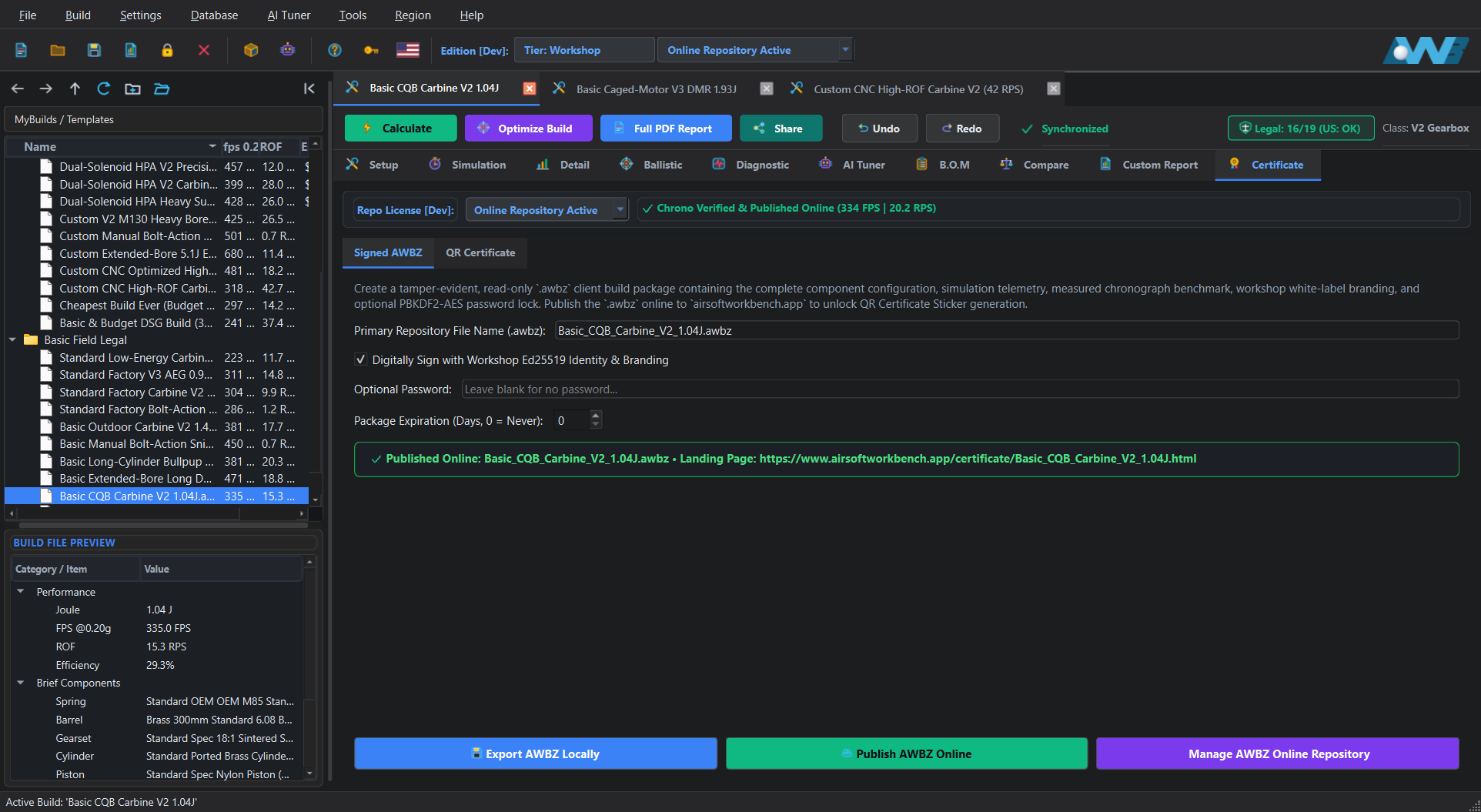
.awbz Certificate Page
See the exact commercial deliverables your shop hands to paying clients and publishes to the web when using Workshop Edition:
Generated directly from the Custom Report tab using a sample accredited shop header (Valkyrie Precision Custom Armory). Includes custom shop logo, Founding Partner badge, Simulated vs. As-Built Chronograph table, 2D cutaway map, itemized parts B.O.M, custom tuner labor pricing, shop warranty terms, and tamper-evident Ed25519 QR seal.
.awbz Landing Page on the Web
Click below to open an actual live Published Certified .awbz Web Landing Page hosted on our repository. This is the exact verification page that opens when a customer or curious player at a game event scans the QR certificate sticker on a workshop-built replica.
When a customer brings a custom-tuned replica to an airsoft event and players gather around asking what is inside, they can scan the sealed QR certificate right on the replica. It opens the web verification page displaying your workshop name, the complete internal build breakdown, and verified performance metrics.
Share .awb and .awbz build files with friends, teammates, and online forums. Anyone can open shared builds in Community Edition to inspect the 3D internal assembly, study part combinations, and get inspiration for their next replica project.
Buying or commissioning a high-end custom replica? Checking the cryptographic build certificate and sealed .awbz record acts as instant insurance that the replica was genuinely built by a renowned tech or accredited workshop with the exact internal parts and benchmark output claimed.
Choose the edition tailored to your role, from personal replica building to advanced bench diagnostics and commercial shop operations:
For skirmishers, weekend players, and builders planning and verifying upgrades for their own replicas.
For dedicated tuners tuning high-speed or HPA builds, connecting bench hardware, and troubleshooting replicas on a chronograph.
The only edition licensed for commercial use by custom build workshops, retail service benches, and custom replica builders serving paying clients.
.awbz client build files and publish certificates to the AWB Online Repository.
The Community Edition lets you explore all supported replica platforms and all 2D and 3D ballistic views in view-only mode. Open shared .awb builds from friends and community peers to inspect their internal setups and get upgrade inspiration, or open a signed .awbz certificate from a renowned builder as insurance that the replica contains the exact parts and performance claimed.
Browse the complete high-level operating manual shipped inside Airsoft Workbench Suite before you even install the desktop app. Learn how to navigate the workspace, select compatible parts, interpret mechanical warning banners, test downrange ballistics, and verify signed workshop builds.
Understand the main workspace layout, edition tier capabilities, project tree navigation, and how to initialize a replica platform from the New Build Setup Wizard or ready-made templates.
Learn how the interactive Part Picker filters compatible components, how Bore-Up vs. Normal-Bore fitment guardrails work, and how to apply custom modifications like short-stroking, AOE spacers, and swiss-cheesing.
Step through a shot cycle millisecond by millisecond in the 3D Cutaway, inspect pressure, current, and tappet timing waveforms, and read yellow warning vs. red mechanical halt banners.
Operate the exterior ballistics range across 2D Side-Profile, 3D Bench with magnified scope PiP, and 3D First-Person Shooter mode. Adjust hop-up nub engagement, BB mass, target distance, and wind.
Use Reverse Chrono Diagnostics to isolate real-world FPS drops, consult the context-aware AI Tuner Copilot, run the Automated Constraint Optimizer, and compare up to 4 builds side by side.
Generate itemized Bills of Materials, print white-label customer quotations and technical PDF reports, export cryptographically signed .awbz certificates with QR stickers, and build custom model packs.
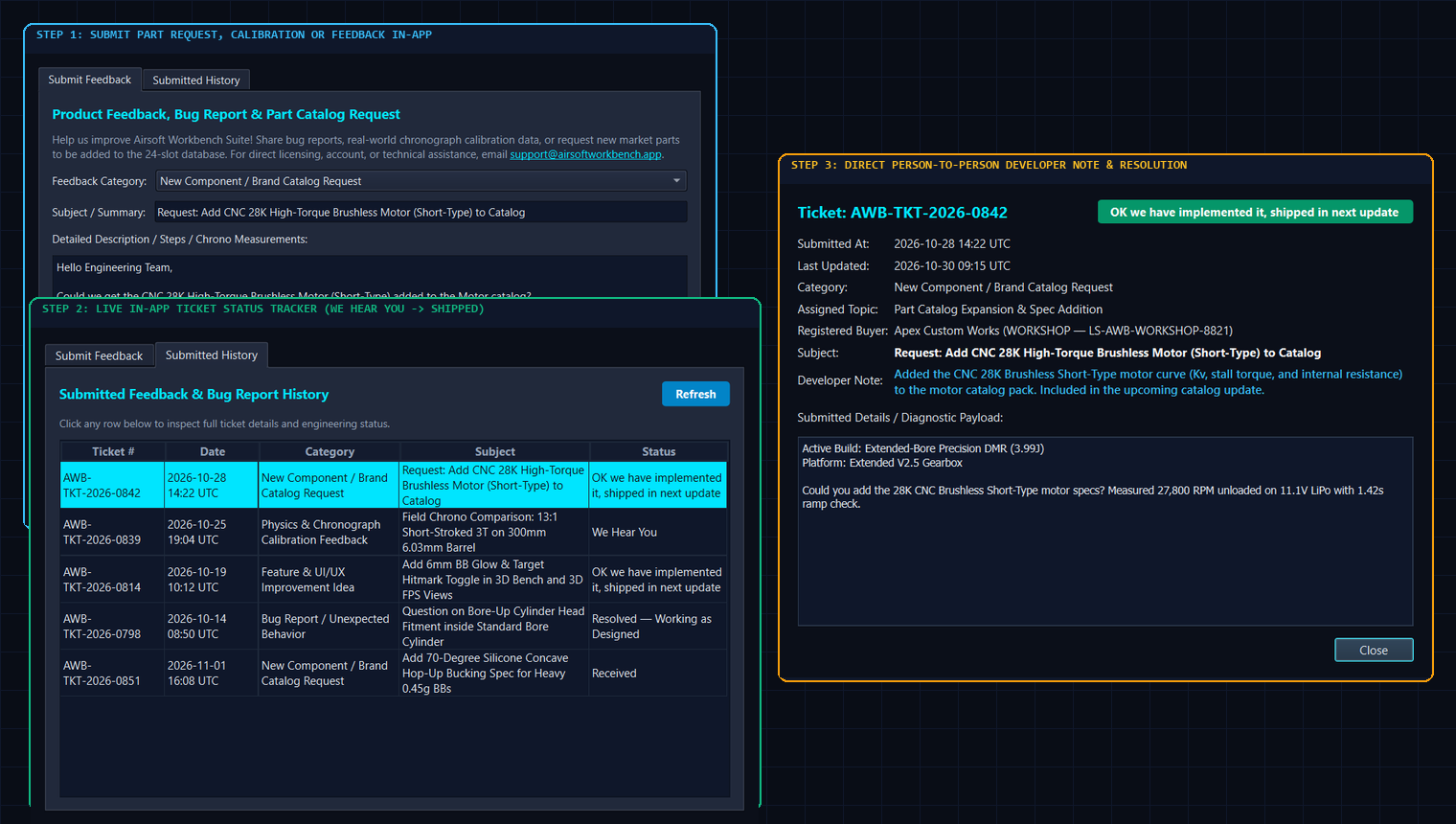
When you invest in engineering software, you should never feel left behind or stuck waiting in an anonymous email queue. Airsoft Workbench Suite includes a built-in, two-way Feedback & Live Ticket Tracker (Help → Send Feedback / Report Bug) that connects your bench directly to the core engineering team.
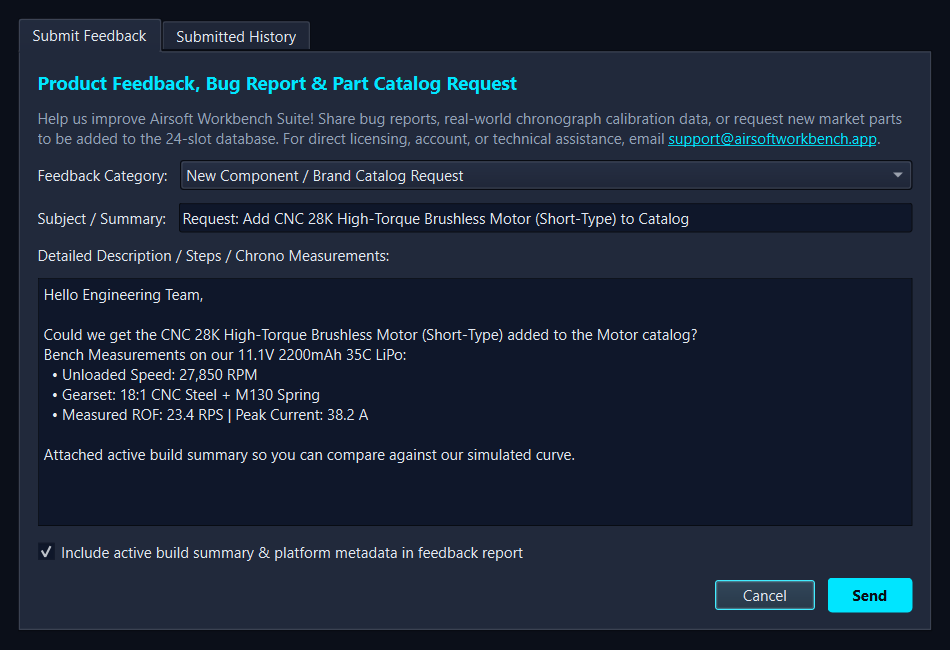
Testing a brand-new motor, bucking profile, or gearset that just hit the market? Submit a catalog request straight from the software with one click and track when our engineers add it to the verified database.
Automatically attach your active build summary and platform telemetry to your ticket. Our engineers review your real-world chronograph numbers person-to-person and write back directly inside your ticket view.
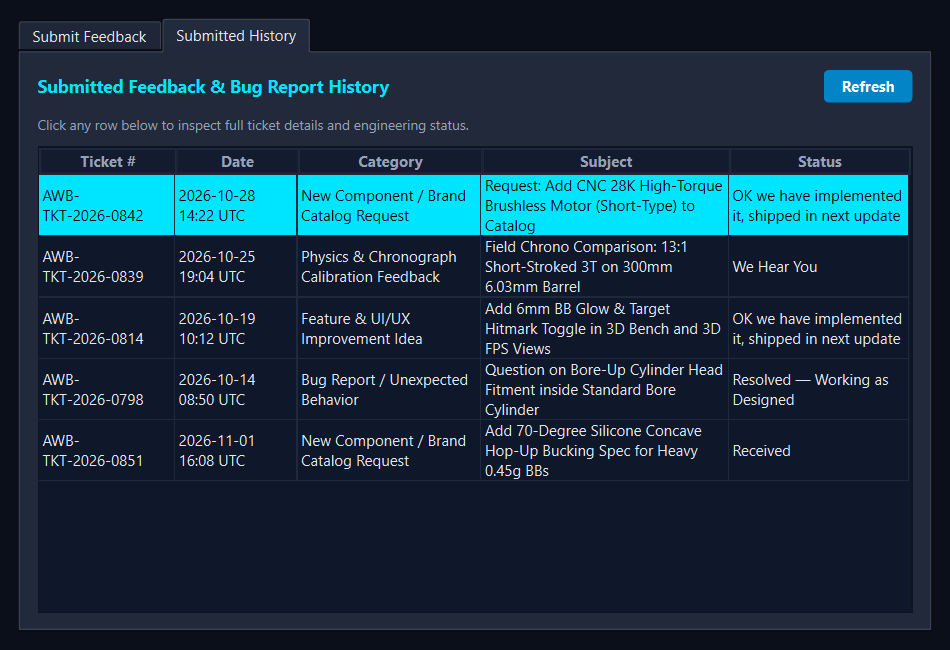
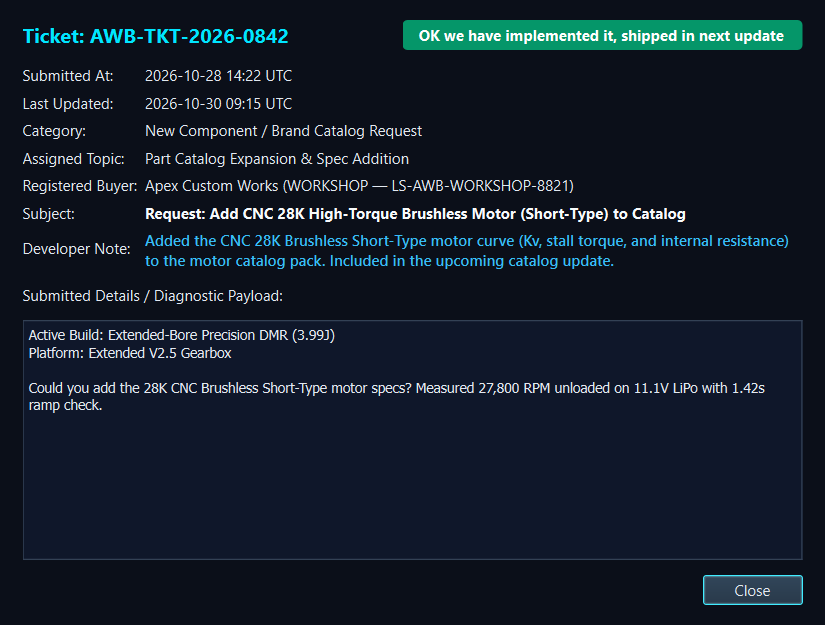
Every submission receives a permanent ticket ID in your Submitted History tab. Watch the status update automatically from Received to We Hear You to OK we have implemented it, shipped in next update, complete with a personal Developer Note.
Click any row in your in-app Submitted History table to open the full ticket dialog and read the personal engineering note written for your build.
Every paid edition is a Perpetual License (buy once, own forever), includes 1 Year of Free Software & Catalog Updates, and is covered by our 14-Day Fair-Use Refund Policy via Lemon Squeezy. All licenses validate with a local hardware-fingerprint cache so your workbench runs 100% offline.
Inspect all replica platforms, run physics and 2D/3D ballistics in view-only mode, and open signed .awbz workshop files.
Full interactive part picking, real-time fitment warning dialogs, custom modifications, simulation, 2D/3D ballistics, B.O.M, and PDF export.
Everything in Sport plus Pro Tools (ROF Measurement, Bluetooth Chrono & ETU), Reverse Chrono Diagnostics, AI Tuner, Optimizer, and Compare.
The sole edition licensed for commercial use. Everything in Pro plus White-Label Client Quotes, Shop Branding, Signed QR Stickers, and .awbz Online Repository.
*Minimum 2 seats. Compounding 20% discount on each additional seat.
All paid editions are Perpetual Licenses with 1 Year of Free Software & Catalog Updates included
| Software Capability / Module | Community Edition $0 Perpetual |
Sport Edition $29 Perpetual |
Pro Edition $49 Perpetual |
Workshop Edition $79 / seat* Perpetual |
|---|---|---|---|---|
| 1. Supported Platforms, Parts Catalog & Setup Guardrails (Setup Tab) | ||||
| All Replica Platforms (Carbine AEG, Caged-Motor AEG, Extended DMR, Bullpup SMG, Heavy Support AEG, Manual Bolt-Action Spring, Modular & Bolt HPA) | All Platforms (View-Only) | Full Edit | Full Edit | Full Edit |
| Interactive 3D Cutaway Viewport (X-Ray, Cross-Section Slicer, Dynamic Stress Overlay) | ||||
Exposed & Editable Global Physics Solver Constants (Settings → Parameters...: Discharge Cd, Friction μ, Heat Transfer h_wall, Adiabatic γ, Drag, Clearances) |
Exposed (View-Only) | Full Edit | Full Edit | Full Edit |
| Multi-Brand Aftermarket Parts Selection & Reverse Parameter Search | OEM Reference (View-Only) | |||
| Interactive Part-Picker Warning, Fitment & Recommendation Dialogs | View-Only Mode | |||
| Custom Tuner Modifications (Short-Stroking, AOE Spacer, Weight Reduction, Hop-Up Mods) | View-Only Mode | |||
Save & Load Editable .awb Build Projects with Undo/Redo History |
Read-Only .awb / .awbz |
Unlimited | Unlimited | Unlimited |
| Community Build Sharing & Peer Build Inspection (Open Shared Builds for Inspiration & Verification) | View Shared Builds | Create & Share | Create & Share | Create & Certify |
| 2. Core Physics Simulation, Durability, Ballistics & B.O.M (Simulation, Detail, Ballistic, B.O.M) | ||||
| Coupled Firing Cycle Physics Solver (FPS, Joules, ROF, Amp Draw, Lock Time) | ||||
| Pre-Build Mechanical Lockup, Pneumatic Leak & Electrical Fault Simulations | ||||
| Time-Domain Waveform Oscilloscope, Durability Fishbone & Component Fatigue Matrix | ||||
| 6-DOF Exterior Ballistics (2D Trajectory Bench, Atmospheric Controls, 3D Outdoor Range & 3D Optic POV) | All Views | All Views | All Views | All Views |
| Automatic Country & Statutory Legal Limit Detection (Joules, Velocity, Joule Creep & Fire-Mode Rules) | ||||
| Itemized Bill of Materials (B.O.M Tab), Spreadsheet Export & Standard PDF Build Report | Unlocked on .awbz |
Included | Included | Included |
| 3. Specialist Pro Bench Tools & Automation (ProTools, Diagnostic, AI Tuner, Compare) | ||||
| Included Pro Tools (ROF Measurement, Bluetooth Chrono Connection, Bluetooth ETU Connection, etc.) | - | - | Included | Included |
| Reverse Chronograph Bench Diagnostics (Measured vs. Simulated Leak & Drag Finder) | - | - | ||
| Context-Bound AI Tuner Copilot (Offline Knowledge Base + Local & Cloud LLM Support) | - | - | ||
| Automated Target Constraint Optimizer (Optimize Build Goal-Seeking Solver) | - | - | ||
| Multi-Build Side-by-Side Comparison (Compare Tab with Matrix, Part Diff & Waveform Overlay) | - | - | ||
| 4. Commercial Use License, Workshop Branding & Certified Event QR Suite (Workshop Exclusive) | ||||
| Commercial Use License (Licensed for Paid Client Builds, Repair Shops & Retail Businesses) | Personal Only | Personal Only | Personal Only | Licensed for Commercial Use |
| White-Label Custom Shop Logo, Business Header & Warranty Terms (Custom Report Tab) | - | - | - | |
| Commercial Client Quotation Builder (Itemized Parts Markup + Custom Tuner Labor Pricing) | - | - | - | |
| Sealed Certified Build QR Stickers for Field Event Presence & Builder Authenticity Insurance (Certificate Tab) | Scan & Verify | Scan & Verify | Scan & Verify | Issue & Seal |
Export Locked & Signed .awbz Client Build Packages + Publish to AWB Online Repository |
Open & View Only | Open & View Only | Open & View Only | Create & Publish |
| Direct In-App Developer Feedback, Part Request & Live Ticket Status Tracker (Person-to-Person Engineering Replies) | View-Only Mode | Direct Line | Direct Line | Priority Line |
| Included Software, Parts Catalog & Online Repository Update Window | Community Releases | 1 Year Included | 1 Year Included | 1 Year Included |
| Perpetual License Seat Allocation & Multi-Bench Volume Discount | 1 Seat | 1 Seat | 1 Seat | Min. 2 Seats* (-20% Compounding) |
| 5. Recommended PC Hardware & System Requirements (Desktop & Laptop Bench Specs) | ||||
| Operating System & Disk Footprint | Windows 10 / 11 (64-bit) 1.5 GB Free SSD/HDD |
Windows 10 / 11 (64-bit) 1.5 GB Free SSD/HDD |
Windows 10 / 11 (64-bit) 2.0 GB Free SSD (8 GB+ with Local AI) |
Windows 10 / 11 (64-bit) 2.5 GB Free SSD (8 GB+ with Local AI) |
| Recommended Baseline PC Spec (Standard 1 to 3 Active Build Tabs, 3D Cutaway & 3D Ballistics) | 4-Core CPU • 8 GB RAM (4 GB Min) Integrated WebGL GPU (Intel UHD / Iris, AMD Radeon, or NVIDIA) |
4-Core CPU • 8 GB RAM (4 GB Min) Integrated or Entry Dedicated GPU (1080p Display) |
6-Core+ CPU • 8 GB to 16 GB RAM Dedicated GPU (2 GB+ VRAM) or Modern iGPU + Bluetooth 4.0 / Mic Input |
6-Core+ CPU • 16 GB RAM Dedicated GPU (4 GB+ VRAM) + Bluetooth 4.0 / Thermal Label Printer Support |
| Additional Spec for Running Many Multi-Build Tabs Simultaneously (5 to 15+ Live 3D & Ballistic Tabs) | 16 GB RAM Dedicated GPU (4 GB+ VRAM) for multiple live 3D WebGL viewports |
16 GB+ Dual-Channel RAM 6-Core CPU + Dedicated GPU (4 GB+ VRAM) |
16 GB to 32 GB RAM 8-Core CPU + Dedicated GPU (4 GB to 6 GB+ VRAM) for Compare & Optimizer |
16 GB to 32 GB RAM 8-Core CPU + Dedicated GPU (6 GB+ VRAM) for Multi-Client Shop Benches |
| Additional Spec for Running Optional Offline Local AI Model (On-Device GGUF LLM in AI Tuner Tab) | Not Applicable | Not Applicable |
Deterministic & Cloud AI: 0 Extra VRAM Offline Local GGUF Model: 16 GB+ RAM & Dedicated GPU with 6 GB to 8 GB+ VRAM (or 8-Core AVX2 CPU fallback) |
Deterministic & Cloud AI: 0 Extra VRAM Offline Local GGUF Model: 16 GB to 32 GB RAM & NVIDIA RTX / AMD GPU with 6 GB to 8 GB+ VRAM |
After completing your Lemon Squeezy checkout (or applying your Closed Alpha code above), paste the License Key from your confirmation receipt below to unlock the Windows standalone distribution directly from our Cloudflare R2 edge vault.
Direct engineering answers to the most common questions about simulation accuracy, catalog parts, perpetual licensing, offline operation, and commercial workshop deliverables.
.awbz reader that supports all platforms and all 2D/3D ballistic views so you can inspect shared peer builds and verify workshop certificates. Sport Edition ($29) unlocks the complete interactive build workflow, part picker, fitment warning dialogs, custom modifications, B.O.M, and standard PDF reports for personal use. Pro Edition ($49) adds specialist bench tools including Pro Tools (Audio ROF, Bluetooth Chrono & ETU connection), Reverse Chrono Diagnostics, AI Tuner Copilot, Automated Target Optimizer, and Multi-Build Compare. Workshop Edition ($79/seat*, min. 2 seats) is the only edition licensed for commercial use and adds White-Label Custom Reports with your shop logo, Client Labor Quotations, Sealed QR Stickers, and AWB Online Repository publishing.
.awbz certificates work for workshops?
.awbz package, publish it to the AWB Online Repository, and print a QR certificate sticker for the replica (open our live sample published .awbz web page here). Players at game events can scan the QR sticker to see your shop's craftsmanship, and second-hand buyers get cryptographic proof that the replica was genuinely built by your workshop.